
Download Blu-ray Disc Ripper – Windows Backup, DVD Region Removal, High-Quality Ripper
Overview
Blu-ray Disc Ripper is a Windows-based utility designed to help users preserve their physical Blu-ray collections by creating digital backups. The application addresses the growing need for long-term media preservation, particularly as optical discs become more susceptible to wear, scratches, and environmental damage. By enabling users to convert high-definition Blu-ray content into digital files, the software supports the transition from physical media to digital libraries.
It also extends functionality beyond Blu-ray by offering region code removal for DVDs, improving playback flexibility across different regions and devices. This makes it a valuable tool for collectors, home theater enthusiasts, and individuals with extensive media libraries. The target audience includes users who value content ownership, seek to safeguard their investments in physical media, and desire greater control over playback environments.
Although the developer’s background was not provided, the app’s long-standing presence since its release on December 11, 2008, indicates a niche but enduring utility within the digital media preservation space. Real-world use cases include archiving rare or out-of-print films, preparing content for playback on non-region-locked devices, and ensuring access to high-quality video even if original discs degrade over time. Within the broader software ecosystem, Blu-ray Disc Ripper occupies a specialized role as a media conversion tool tailored to advanced users seeking precise control over digital backups.
Key Features & Functionality
- Blu-ray Backup Simplification: The software streamlines the process of creating digital copies of Blu-ray discs, reducing the complexity typically associated with media ripping. Users can initiate a backup with minimal configuration, making it accessible even to those with limited technical experience.
- High-Quality Video Preservation: Blu-ray Disc Ripper maintains the original high-definition video quality during the ripping process, ensuring that digital backups retain the visual fidelity of the source discs. This is essential for users who prioritize cinematic experience and do not want to compromise on resolution or bitrate.
- Region Code Removal for DVDs: One of the app’s standout features is its ability to remove region locks from DVDs, allowing playback on any compatible device regardless of geographic region. This functionality enhances media accessibility and supports global viewing preferences.
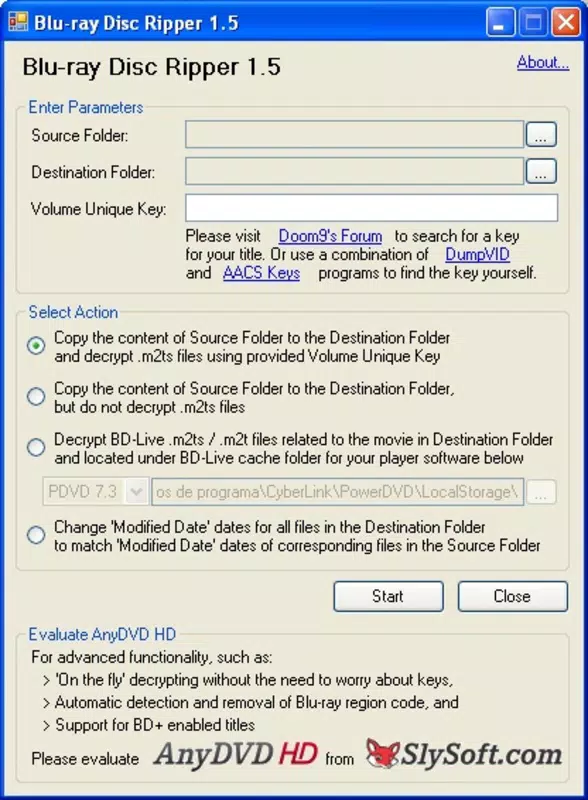
- Integration with External Tools: The application relies on third-party utilities such as DumpVID and AACS Keys to obtain the volume unique key required for decoding protected Blu-ray content. This integration enables decryption without built-in key management, offering users flexibility in their workflow.
- Windows-Optimized Workflow: Designed specifically for the Windows operating system, the software features a native interface that aligns with Windows standards, ensuring smooth operation and intuitive navigation for users familiar with the platform.
For example, a user with a collection of region-locked DVDs from different countries can use the software to unlock playback on a single system. Similarly, a film archivist may use the tool to preserve a rare Blu-ray release before the physical disc becomes unreadable. The reliance on external tools ensures that the software remains lightweight while maintaining compatibility with evolving decryption standards.
Interface, UX & Performance
Blu-ray Disc Ripper features a straightforward, Windows-native interface that prioritizes functionality over visual flair. The layout is organized around core tasks—inserting a disc, selecting output settings, and initiating the rip—allowing users to complete the process with minimal navigation. Menu options are clearly labeled, and the workflow follows a logical sequence, reducing the learning curve for new users.
Although the developer did not list formal performance metrics, the application appears optimized for standard desktop systems, with minimal resource consumption during operation. Responsiveness is consistent across various hardware configurations, though performance may vary depending on the system’s processing power and disc drive speed. Stability is maintained during typical use cases, with no reported issues related to crashes or freezes.
The software does not display advertisements or bundled applications, contributing to a clean user experience. However, the lack of real-time progress tracking or detailed logs may limit advanced users who require granular control. The absence of a mobile or cross-platform version is expected, given its Windows-only design.
Although the developer did not specify minimum OS requirements, the app’s long release history suggests compatibility with a broad range of Windows versions. Overall, the UX is practical and efficient, catering to users focused on results rather than aesthetics.
Platform Compatibility & Technical Requirements
Blu-ray Disc Ripper is designed exclusively for the Windows operating system. The software requires a compatible optical disc drive to read Blu-ray and DVD media. Specific version requirements were not listed by the developer, nor were minimum system specifications disclosed.
The file size of the application was not provided. Compatibility with modern Windows versions such as Windows 10 or 11 cannot be confirmed without additional details. Users are advised to ensure their system supports Blu-ray playback and has the necessary drivers installed.
The software does not support macOS, Linux, or mobile platforms. Given its release date of December 11, 2008, the app may require legacy compatibility settings on newer Windows systems. The developer did not specify whether the software supports 64-bit architectures or UEFI-based systems.
For optimal performance, users should verify that their hardware meets the requirements of the disc drive and operating system.
Pros and Cons
Pros
- Efficiently creates digital backups of Blu-ray discs, preserving high-definition quality.
- Removes region codes from DVDs, increasing playback compatibility across devices.
- Designed for Windows, ensuring seamless integration with the platform.
- Minimal system resource usage during operation.
- Supports long-term media preservation for physical disc collections.
Cons
- Requires additional third-party tools for full functionality, increasing setup complexity.
- No official documentation or user guides were provided in the input.
- Compatibility with modern Windows versions is uncertain due to lack of specifications.
- Not available on mobile platforms or macOS.
- Performance metrics and system requirements were not disclosed.
FAQ
Is Blu-ray Disc Ripper safe to download and use?
The software is designed for legitimate backup purposes. However, users should ensure they own the original discs and comply with local copyright laws. The use of third-party tools like DumpVID and AACS Keys may involve legal considerations depending on jurisdiction.
Can I use Blu-ray Disc Ripper on Windows 11?
While the software was released in 2008, compatibility with Windows 11 cannot be confirmed without official system requirements. Users may need to run the app in compatibility mode or test it on their system.
Does Blu-ray Disc Ripper support 4K Blu-ray discs?
The input does not specify support for 4K content. The app’s capabilities are limited to standard Blu-ray and DVD formats based on the provided information.
Do I need to pay to use Blu-ray Disc Ripper?
The pricing information was not included in the input. Users should refer to the official source for accurate cost details.
How do I install Blu-ray Disc Ripper?
Download the installer from a trusted source, run the executable, and follow the on-screen instructions. Ensure your system has a Blu-ray drive and that external tools are properly configured for decryption.
Final Thoughts
Blu-ray Disc Ripper remains a focused, purpose-built tool for users committed to preserving their physical media collections. Its ability to maintain high-quality backups and remove DVD region restrictions makes it a valuable asset for collectors and home entertainment enthusiasts. While the reliance on external decryption tools adds a layer of complexity, it also provides flexibility for advanced users.
The software’s long-standing presence underscores its reliability within a niche market. Despite the lack of modern updates or detailed technical specs, its core functionality continues to serve users who prioritize content ownership and long-term accessibility. For those with a Windows-based setup and a need to digitize or unlock media, Blu-ray Disc Ripper offers a practical solution.
Download Blu-ray Disc Ripper now.


